Unity Editor version: 6.2 ML2 OS version: 1.12.1 Unity SDK version: 2.6.0 Host OS: Windows
Hello,
If I record a video of my app, all the non-virtual background is black.I’m using the default URP. I have disabled HDR as suggested here (but can’t “Uncheck the Post Processing option” as it is not there in Unity 6.2) and tried to remove everything I could find about post-processing, but still I get the black background. I also unchecked the post-processing tick on the camera.
Could someone please give me some steps to solve this?
For post processing, it can be in many places in Unity 6, so just double check the following in your scene:
No Volume Profiles with Bloom, ToneMapping, Exposure, Color Adjustments (all Post processing features)
No Global Volume in the scene
No Camera Output → Post Processing toggle
It sounds like this is already done but just double check to make sure your Camera object’s background is set to Solid Color and that the color is black (RGBA (0,0,0,0))
It may also help to know how you are attempting to capture the app. Are you making a recording from the headset or trying to record using the MLHub or some external software?
Camera > Background type: solid color, black (0,0,0,0)
Camera > Rendering > Post-processing: unchecked
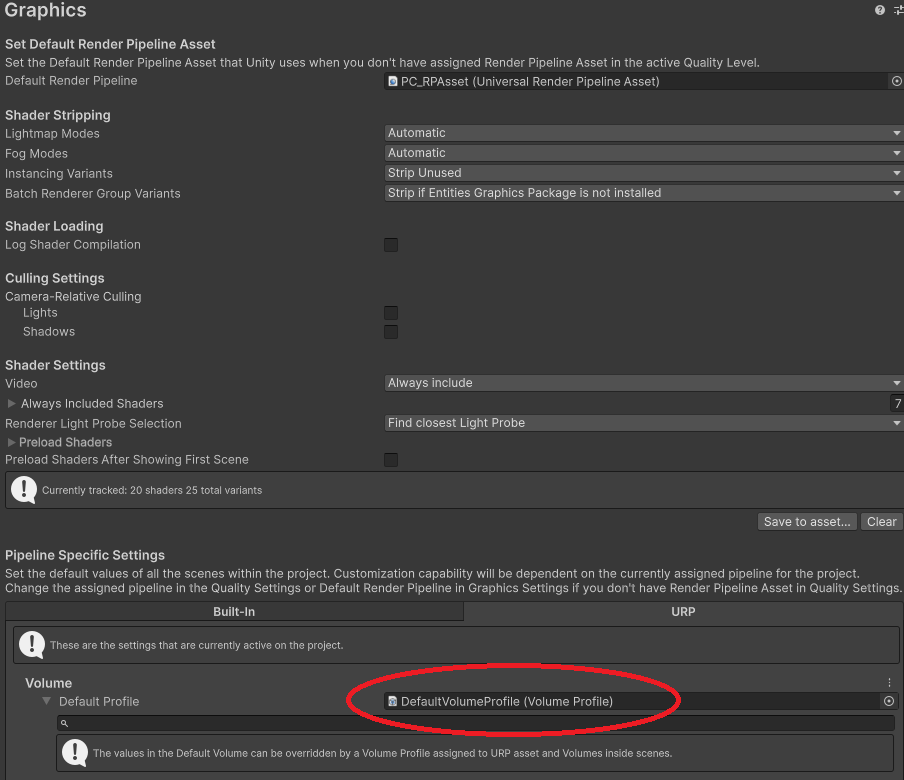
Project Settings > Graphics > Pipeline Specific Settings
URP: Here I cannot use “None” for the default profile (the editor won’t pick it), so I keep the DefaultVolumeProfile. Maybe the issue? But I tried with a VolumeProfile with everything unchecked too.
Don’t know if this would help but I had the same issue with Unity 6. I fixed it by going to Project Settings → Qualtiy and deleted the “Render Pipeline Asser”. I think this is something added by Unity 6 that’s not covered in the ML 2 documentation yet.
Thanks a lot for the reply. This still wasn’t it but I finally figured that I was modifying the default URP Asset while a Quality level using another URP asset was actually used by the application. Once I unchecked HDR on that, problem was solved!